Meow! How Can We Help?
Customer
Modify, Cancel & Refund – 6 questions answered
Sitters on Meowtel are independent service providers.
Cancellation refunds depend on the timing of the cancellation and are determined by the independent sitter.
- Cancellation within 24 hours of booking: Customers may cancel within 24 hours of booking a reservation for a 100% refund, as long as the reservation has not yet begun.
- Cancellation more than 48 hours before the start date*: If you cancel more than 48 hours before the reservation start date, you’ll receive a 100% refund. The sitter will not receive any of their planned earnings.
- Cancellation between 24-48 hours before the start date*: Customers will receive a 50% refund, and the sitter will receive 50% of their planned earnings.
- Cancellation within 24 hours of the start date*: No refund will be issued for cancellations within 24 hours of the start date. The sitter will keep 100% of their planned earnings.
Many sitters choose to offer refunds when cancellations happen close to the start date, while others may retain some or all of their planned earnings to account for reserved time and preparation. Any refund issued after this point is entirely at the sitter’s discretion. We encourage you to message them directly if you have questions.
*All cancellation timing is based on the sitter’s time zone. The start date is defined as 12:00 AM on the first day of the reservation.
Refunds
Refunds are issued as credits to your Meowtel account balance first.
- Credits never expire
- Credits are non-transferable
- You can request a refund for any eligible account balance directly from your Transactions screen, and it will be sent back to the original payment method.
For help with refunds, please contact the Meowtel Bellhop or use Live Chat.
*Note on Using Sitter Earnings
If sitter earnings were used to pay for a reservation, any refunded amount will be issued as a credit to your Meowtel account for future reservations or tips. These credits cannot be transferred back to the sitter’s balance or withdrawn as a payout.
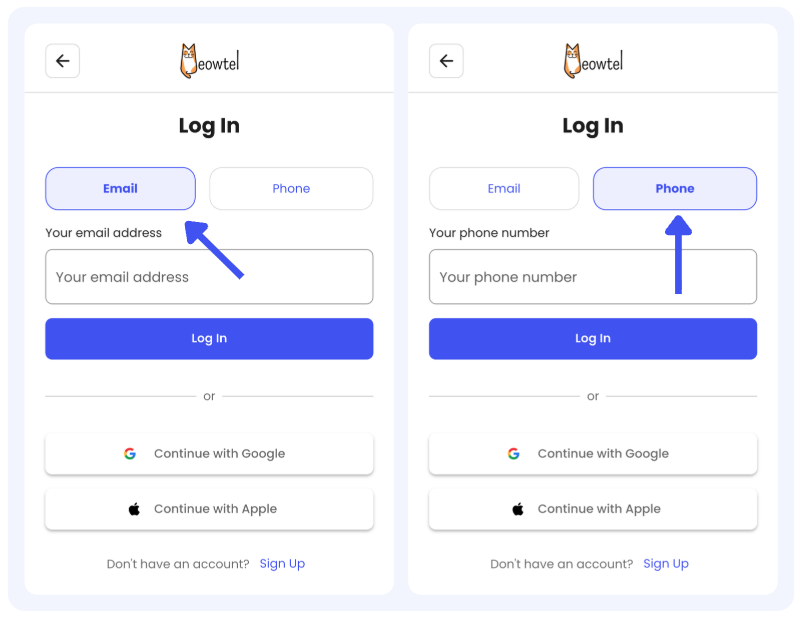
Log in to your Meowtel account
- Log in to your Meowtel account using your phone number or email address on Meowtel.com or the Meowtel App.
Go to your Reservations tab
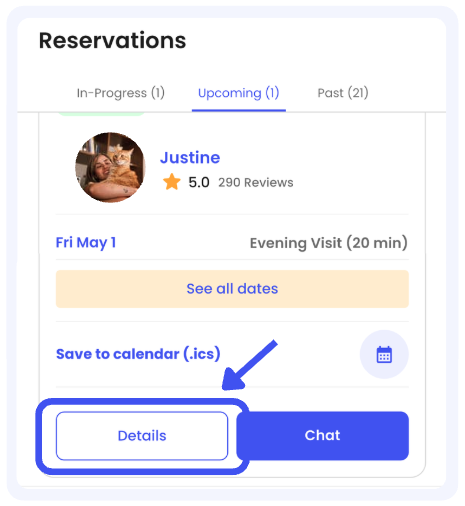
- Once logged in, navigate to the “Reservations” button on the app.

Select the Reservation you wish to modify
- Locate the reservation you wish to edit and click “Details”
Modify your Reservation
- Click “Modify Reservation” then edit your preferences.
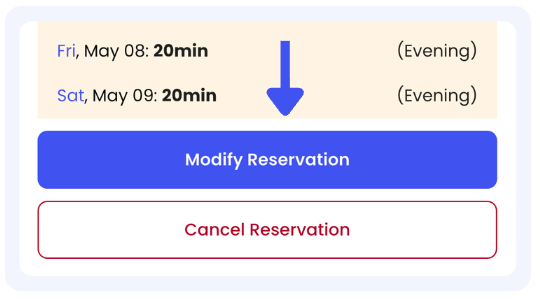
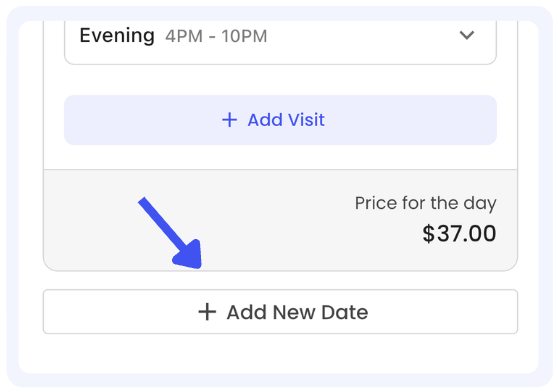
- To add a date you can scroll at the very bottom of the page and press “add new date” below all visits listed.
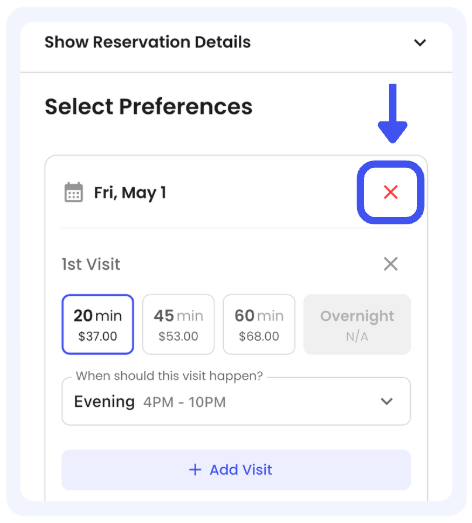
- To remove a date click the red X on each date.
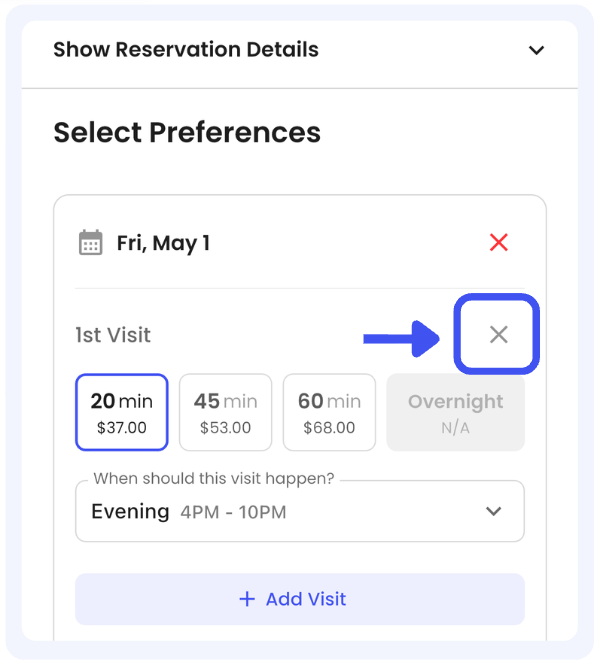
- To remove a visit click the grey X on each visit.
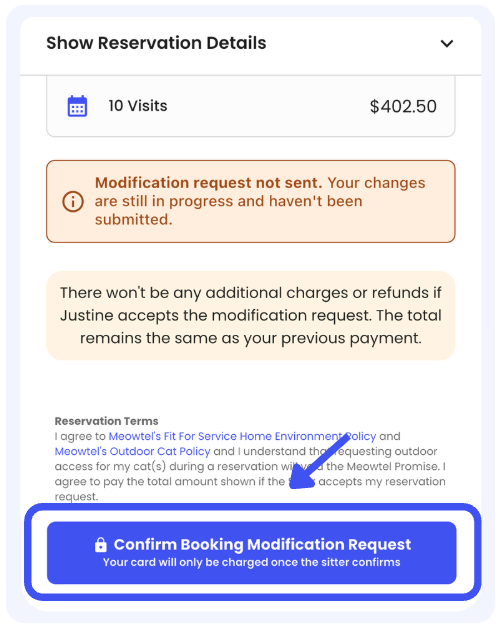
Confirm your Modification Request
- Please be sure to click “Save and Continue” and then select “Confirm Modification Request.” This ensures your request is fully submitted.

- Current or past dates cannot be modified; only future dates can be changed. If an urgent, same-day change is required, please contact the Bellhop at [email protected] or 844-MEOWTEL (1-844-636-9835) for assistance.
- You'll only be able to choose from the sitter's available dates.
- If a sitter has changed their rate or holiday surcharge since the original reservation was made, the new rate or surcharge will be applied to the new visit(s) or a modified visit only if the visit's duration, time preference, or timing has been updated. If no changes were made to the visit, the original rates and surcharge will be honored.
- Every modification request is sent to the sitter for approval. Important: Please be sure to “Save & Continue” after making your updates to route the request to the sitter for review (both parties should receive confirmation of this request if submitted correctly).
- If today is the final day of your reservation, you will not be able to modify it to add additional visits. Instead, please send the sitter a new reservation request for the additional visit(s).
- You can only select new dates within a 15-day window before your original reservation start date, or 15 days after your original reservation end date. If you'd like to select dates that are further out, a new reservation request will need to be submitted.
In the rare event that your sitter needs to cancel due to reasons such as a health emergency or a car accident, once Meowtel is notified of the cancellation, you will be contacted. If the cancellation occurs within seven (7) days of the reservation* start date and you wish to rebook with a different sitter, our support team will work to help you find a new sitter, honor the lowest rate between the two sitters, and issue any applicable credit. If the cancellation occurs outside of this seven (7) day window, or you prefer not to rebook, we will issue a full credit to your Meowtel Account Balance.
*Only eligible reservations qualify for the Meowtel Promise
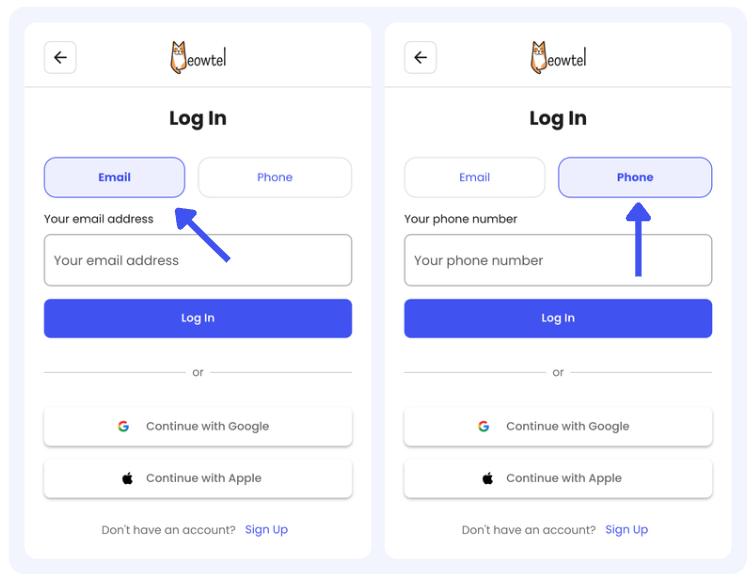
Log in to your Meowtel account
- Log in to your Meowtel account using your phone number or email address on Meowtel.com or the Meowtel App.
Review our Cancellation Policy
- Cancellation refunds depend on the timing of the cancellation and are determined by the independent sitter. You can review our Cancellation Policy first before proceeding with a cancellation here: What is your Cancellation Policy?
Cancel your reservation
- Navigate to “Reservations” on the lower part of the app.

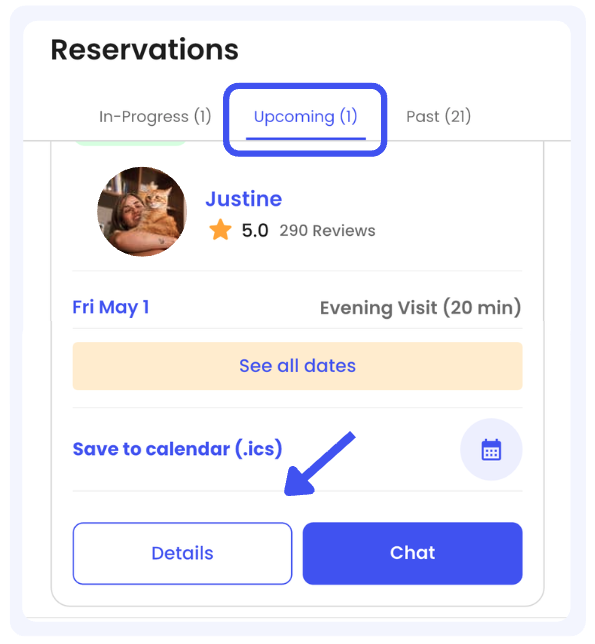
- Select the Reservation you wish to cancel and click “Details”
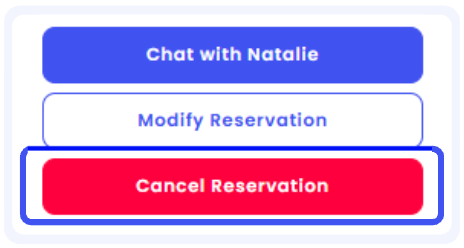
- Click “Cancel Reservation”
- Follow the prompts, select your cancellation reason, and confirm the cancellation.

- You will receive a confirmation email once the reservation is cancelled.
- Reservations must be cancelled from your Meowtel account via web or the Meowtel App.
- Cat sitters are unable to initiate cancellations within the Meowtel site or App.
- All cancellation timing is based on the sitter’s time zone. The start date is defined as 12:00 AM on the first day of the reservation.
- Refunds are issued as credit to your Meowtel account balance first. You can request a refund to your original payment method for any eligible account balance by visiting the Transactions page and clicking “Refund Balance”.
- If you have any questions or need assistance, please reach out to our support team at 844-MEOWTEL (1-844-636-9835) or via email at [email protected].
When a Concern Arises During a Reservation
If something unexpected or concerning occurs during a reservation, we encourage open communication between you and your sitter whenever possible. Many situations can be clarified or resolved through direct conversation.
If additional support is needed, our team is here to help. We can step in to review what occurred and support next steps as appropriate.
Preparing Your Submission
To help us understand the situation clearly and fairly, you can prepare your submission by collecting the following:
- Timeline of events: Note when the incident occurred and key details about what happened.
- Photos or videos: Any visual documentation that shows the issue or provides context. This can include security/doorbell footage or anything with timestamps or metadata.
- Communications: While the Meowtel Inbox will be used as our primary reference point, if communication occurred off-platform, we kindly ask for screenshots of those interactions.
- Receipts or invoices: Documentation related to services, purchases, or expenses associated with the reservation.
- Additional context: Any other relevant information that you believe may be useful in our review.
Keeping your documentation organized and on the Meowtel platform can help our team review the situation more efficiently.
How to Share a Concern or Complaint
- Report the concern during the reservation or within 72 hours of the incident
- Contact us by: Calling or texting 1-844-MEOWTEL (1-844-636-9835) or; emailing [email protected]
- Include the documentation and details prepared in the previous step
- Respond promptly if our team requests additional information to help clarify the situation
What Happens Next
Once we receive the information, our team will review the details shared by both parties. We may follow up with clarifying questions to better understand what occurred.
To help keep the review process moving forward, we ask that any requested documentation be submitted within 14 days of reporting the concern.
Our goal is to review each matter carefully and as promptly as possible once all relevant information has been received.
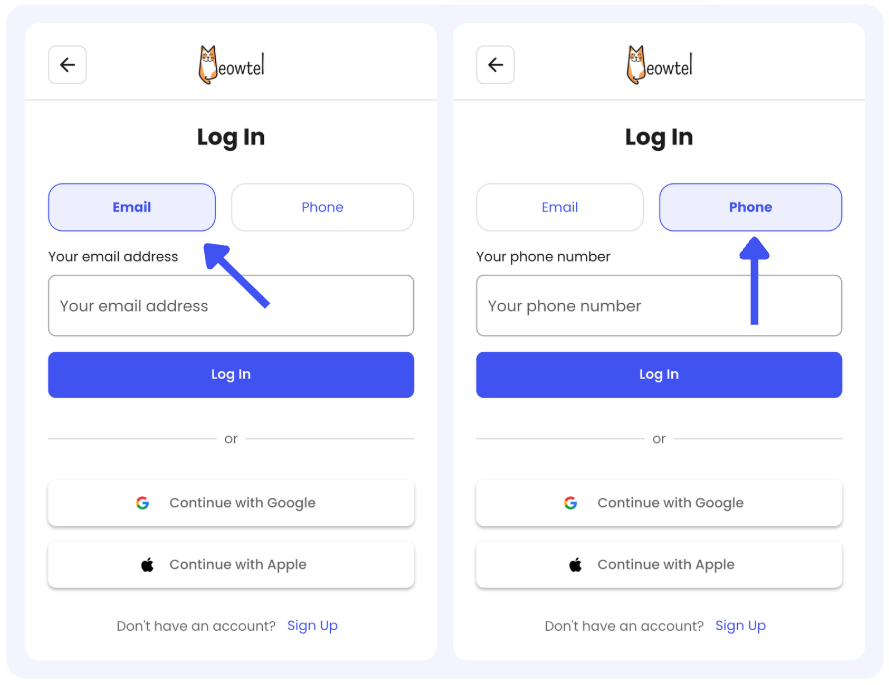
Log in to your Meowtel account
- Log in to your Meowtel account using your phone number or email address on Meowtel.com or the Meowtel App.
Head to your Transactions
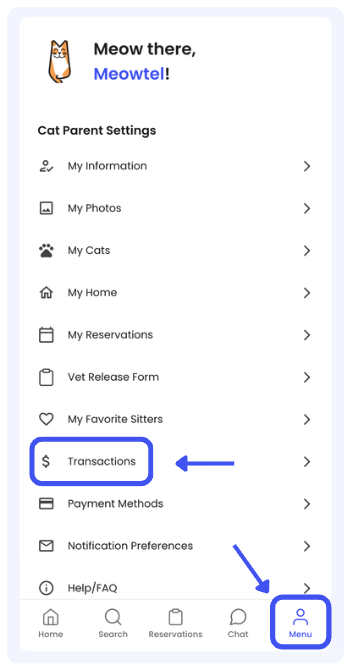
- Navigate to Menu and tap "Transactions" within the menu bar.
Refund your balance
- Click “Refund Balance”
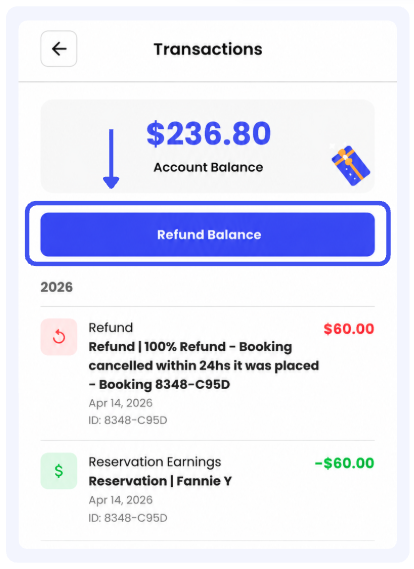

- All refunds are initially issued as credits to your Meowtel account balance.
- Once you’ve requested a refund from your Transactions screen, your refund will be reflected on your original payment method within 5 - 10 business days, depending on your financial institution.
- If sitter earnings were used to pay for a reservation, any refunded amount will be issued as a credit to your Meowtel account for future reservations or tips. These credits cannot be transferred back to the sitter’s balance or withdrawn as a payout.
- If you have any questions or need assistance, please reach out to our support team at 844-MEOWTEL (1-844-636-9835) or via email at [email protected].