Choosing the right photos for your Meowtel sitter profile can make all the difference when cat parents are searching for their next cat sitter. In purrticular, a clear, friendly profile photo can help you make a great first impression, especially if there's a kitty by your side! 🐾
First, Why Your Profile Photo Matters
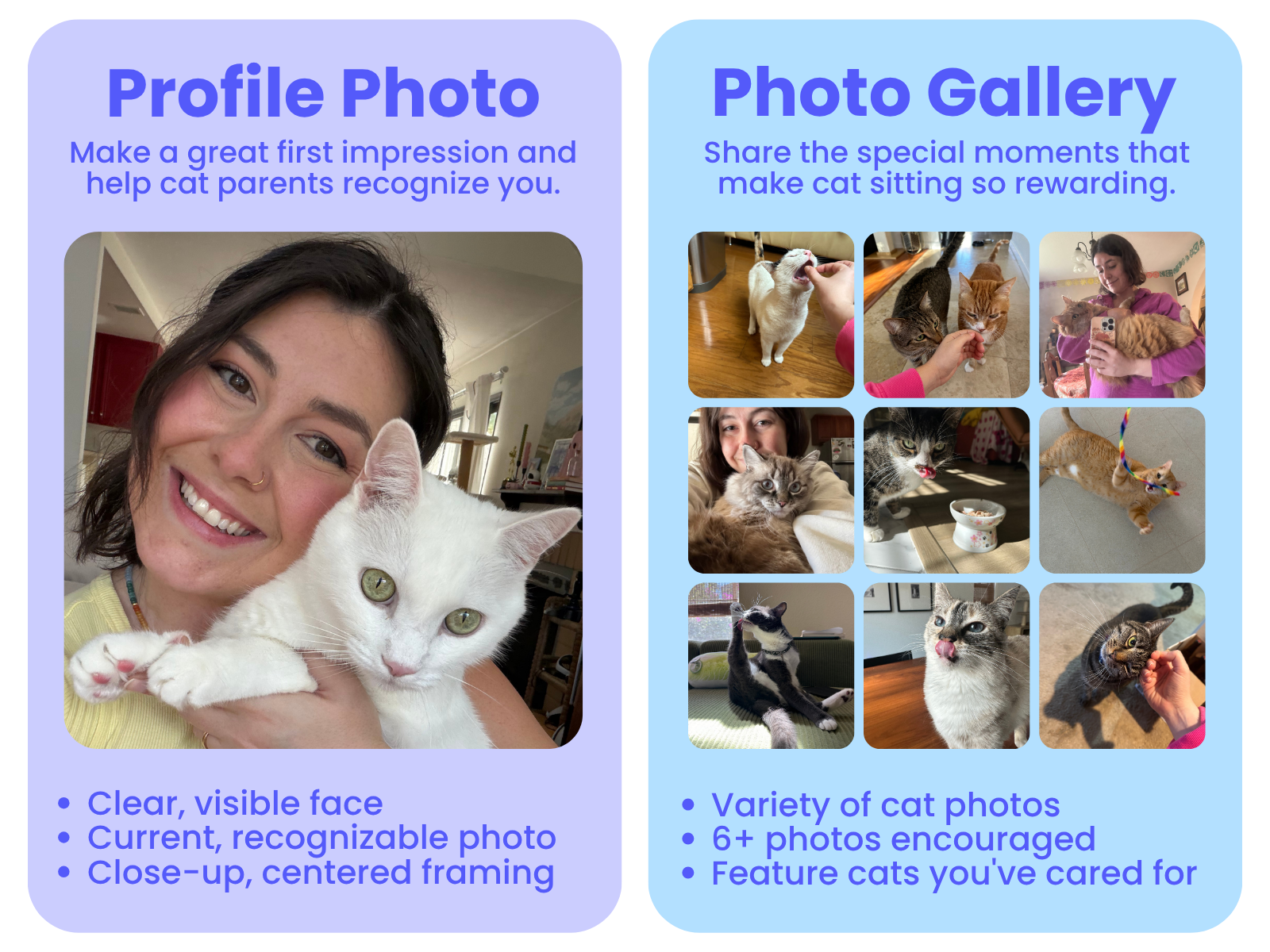
Your Meowtel sitter profile features two types of photos, and each plays a role in helping cat parents get to know you:
Your Profile Photo: One of the first things cat parents see when browsing sitters on Meowtel! A well-lit, smiling headshot helps you stand out in search results and encourages cat parents to explore your profile. A recent photo with your face fully visible helps build trust, so cat parents know who to expect when they meet you in person at your first Meet & Greet. To avoid blurriness, aim for an ideal resolution of 1,920 × 1,920 pixels or higher.
Your Photo Gallery: Displayed alongside your profile photo, your gallery is an opportunity to show off your love of cats, your experience, and a little of your purrsonality! Adding 6 or more gallery photos to help cat parents get to know you even better. Need some inspiration? Check out our Cat Photo Tips Blog Post here!
Lights, Camera, Meow! 📸 Your Step-by-Step Photo Guide
Ready to put your best paw forward? 🐾 You don't need a professional photographer or fancy equipment to capture a great profile photo - your smartphone is all you need! You can follow these steps to get that purrfect shot.
1. Find your Light ☀️
Find a spot near a window with soft, natural light and face toward it to evenly illuminate your face. Keep in mind that harsh, direct sunlight can cause squinting and shadows, while a bright window behind you can make your face difficult to see.
2. Find Your Best Angle 📱
Position or prop up your camera at eye level and sit or stand upright, facing the camera. Holding your phone too high or too low can create angles that make your photo look less natural or distort your appearance. Stay centered so you (and the kitty!) are the focal point of the image.
3. Get the Framing Just Right 🖼️
Aim for a head-and-shoulders shot with your face centered and fully visible. Photos taken too far away can lose that personal touch, while photos taken too close may result in awkward cropping. Find a comfortable distance that keeps you (and your kitty companion!) centered in the frame, with a little extra space around you for cropping. A clean, clutter-free background helps keep the focus on you!
4. Including a Cat? Keep it Cozy! 😻
Last but certainly not least, if you can, include a willing cat purrticipant! Holding a cat or having them sit beside you not only shows off your bond but also instantly makes your profile more attractive to cat parents - after all, they’re here for the cats! Aiming for a photo of your face that is clear, upright, fully visible and your feline friend is comfortable posing with you.
🙀 No cat available? No problem! We know that cats aren’t always the most cooperative - so no need to force it! A friendly photo of just you works beautifully, too.
📸 Toebean Tip: Trying to get the purrfect shot of your fidgety feline looking at the camera? Turn on Live Photos (iPhone) or Motion Photos (Android phones)! These features capture a few moments around your shot, so you can pick your favorite frame.
🎥 Want a little help getting your kitty to cooperate with the camera? Check out our quick video for taking photos with cats!
Is Your Profile Photo Up to Scratch? 📸
Here’s how to make sure it's picture-purrfect quality! A photo that's too small may appear blurry on your Meowtel profile, even if it looks great on your phone.
🔮 The magic number: The minimum photo requirement size is 1,060 x 1060 pixels, or ideally 1,920 x 1920 pixels or higher,is even betterfor a crisp, clear profile photo! Meowtel supports photos up to 3,000 × 3,000 pixels.
Here's how to check your photo's size:
iPhone: Open your photo in the Photos app, then swipe up or tap the ⓘ info button to see its dimensions.
Android: Open your photo in Google Photos, then swipe up or tap the three-dot menu to view its details.
Computer: Right-click your photo and select Get Info (Mac) or Properties → Details (Windows).
🐾 Toebean Tip: If your photo is too small, try finding the original image rather than enlarging it. Screenshots, heavily cropped photos, and images saved from social media may lose quality!
A Few Final Photo Checkpoints 🐾
Before uploading your new profile photo, take a peek at this checklist to help you choose a picture that looks great and meets Meowtel's profile photo guidelines!
A Familiar Face: Choose a recent photo with your full face visible, without sunglasses, masks, heavy filters, or other people in the frame (even if they've been cropped out!).
Make a great first impression: A friendly, polished, and approachable photo goes a long way! Skip mirror selfies, photos taken in bed, bathrooms, or cars, and photos featuring animals other than cats.
Keep it real: Choose an original, high-quality photo rather than a screenshot, illustration, AI-generated or AI-altered image, or photo containing text or watermarks.
A friendly heads-up: Meowtel maintains photo guidelines to help keep sitter profiles clear, trustworthy, and welcoming. Photos that don't meet these guidelines may need to be updated or removed.
With these tips in paw, you're well on your way to creating a sitter profile that not only looks professional but also radiates warmth and genuine love for cats. Remember, your profile photo and gallery are the first steps towards building trust and rapport with potential cat parents. Make every shot count!